5 Best MobaXterm Alternatives for Mac and Windows in 2027
MobaXterm combines SSH sessions, an SFTP file browser, X11 forwarding, and remote desktop tools in a single Windows application. That makes it useful for system administrators who move between Linux shells and remote graphical desktops. But it is not a native macOS application, and its broad toolkit is not always the right fit for developers who mainly maintain Linux VPS instances.
If you are looking for MobaXterm alternatives, start with the work you actually need to do. Do you want a modern SSH terminal, a remote desktop manager, or a visual way to manage Docker containers and Linux services? Those are different requirements, and no single replacement covers every MobaXterm feature equally well.
This guide compares five options for 2027, based on publicly documented features reviewed in November 2026.
Why look for a MobaXterm alternative?
There are three common reasons to switch:
- You use a Mac. MobaXterm is designed for Windows, so macOS users need another application or a different workflow.
- You primarily manage Linux servers. A large collection of remote desktop protocols may be unnecessary if most of your work involves logs, processes, files, and Docker.
- You prefer a different terminal experience. A modern interface, open-source licensing, or a simpler SSH setup may matter more than an embedded X server.
MobaXterm remains a capable choice for Windows users who depend on X11 forwarding, RDP, VNC, and SSH in one workspace. The alternatives below serve somewhat different priorities.
Quick comparison: MobaXterm alternatives
| Tool | Desktop platforms | SSH terminal | File transfer | Best suited for |
|---|---|---|---|---|
| Server Explorer | macOS, Windows | Yes | Integrated remote file management | Visual Linux VPS administration |
| Termius | macOS, Windows, Linux | Yes | SFTP | SSH sessions across multiple devices |
| Tabby | macOS, Windows, Linux | Yes | SFTP via plugins/integrations; verify setup | Customizable terminal workflows |
| Royal TS / Royal TSX | Windows / macOS respectively | Yes | FTP, SFTP, SCP | Multi-protocol remote connection management |
| WindTerm | Windows, macOS, Linux | Yes | SFTP support | Feature-rich terminal workflows |
Feature availability can vary by version, operating system, and edition. None of these should be assumed to provide a drop-in replacement for MobaXterm’s integrated Windows X11 server.
1. Server Explorer — Best for visual Linux VPS management
Server Explorer is a desktop SSH application for developers who want to manage Linux servers without doing every task through shell commands. It runs on macOS and Windows.
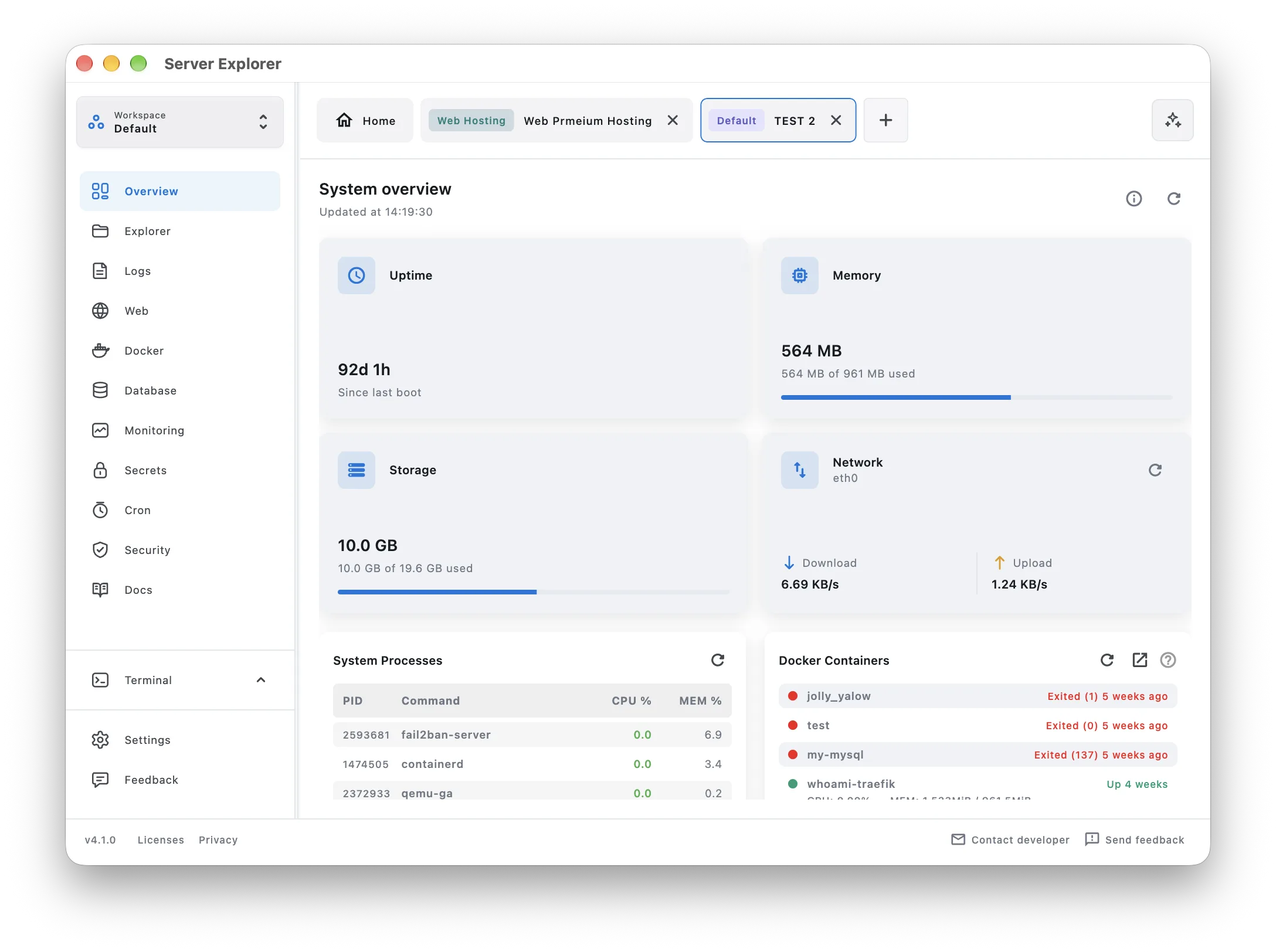
Alongside an integrated SSH terminal and remote file explorer, Server Explorer provides graphical tools for everyday administration. Depending on the server setup, you can inspect resource usage, work with Docker containers, manage PM2 applications, review processes and ports, and perform systemd service actions.
This distinction matters. MobaXterm is primarily a remote-access toolkit; Server Explorer focuses on what happens after you connect to a Linux server.
Why choose it?
- Browse and edit remote files from a graphical interface.
- Keep terminal access available when commands are the better tool.
- Inspect CPU, memory, disk, processes, and open ports without assembling several shell commands.
- Work with Docker, PM2, cron jobs, and Linux services from dedicated views.
- Switch between multiple server connections within the desktop app.
Limitations
Server Explorer is not a general-purpose RDP/VNC/X11 replacement. If your workflow requires launching remote Linux desktop applications through MobaXterm’s built-in X server, choose a tool that explicitly supports that requirement.
Best for: indie developers, freelancers, and small teams maintaining Linux VPS instances and web applications.
For a practical example, read how to manage a VPS without the command line.
Bring your servers into focus.
A desktop app for macOS and Windows. Connect over SSH.
2. Termius — Best for SSH across devices
Termius is a modern SSH client available on macOS, Windows, Linux, iOS, and Android. It emphasizes saved hosts, SSH keys, terminal productivity, and workflows that extend beyond a single desktop computer.
Its interface is a good match for developers who regularly connect to the same machines and want a consistent SSH experience on different devices. Termius also documents SFTP, snippets, and port forwarding.
Why choose it: broad platform support, organized SSH hosts, and a polished terminal-focused experience.
Trade-off: if you want dedicated dashboards for Docker, system processes, or PM2 rather than terminal commands, you may prefer a server-administration-oriented application.
Best for: developers who work from several computers or occasionally need SSH access on mobile.
3. Tabby — Best for a customizable terminal
Tabby is a cross-platform terminal application with SSH capabilities and an extensible design. It is appealing to users who prefer a configurable terminal workspace over an all-in-one remote administration suite.
You can use it as a local terminal as well as for remote sessions. Its plugin-based approach makes it flexible, although the exact file-transfer workflow depends on the installed features and configuration.
Why choose it: customization, terminal-first workflow, and cross-platform availability.
Trade-off: it is not intended to reproduce MobaXterm’s full combination of RDP, VNC, and an integrated X11 server.
Best for: developers comfortable working in the terminal who want a more personalizable interface.
4. Royal TS and Royal TSX — Best for Mixed Remote Environments
Designed for managing different types of remote connections, Royal TS runs on Windows, while Royal TSX is available for macOS. Both tools support multiple remote access protocols, including SSH, RDP, and VNC. Royal TSX also offers SFTP integration and credential management, making it a practical choice for administrators working across different systems.
This makes the Royal Apps family particularly relevant if you use MobaXterm to reach more than Linux servers. Instead of choosing a dedicated SSH client, you can keep remote desktop and terminal connections together.
Why choose it: multi-protocol connection management, reusable credentials, and support for different operating systems through the appropriate desktop application.
Trade-off: it may be more software than you need if your daily work consists mainly of Linux VPS maintenance. Some capabilities differ between Windows and macOS, so compare the editions before purchasing.
Best for: IT administrators managing a mixture of Linux hosts, Windows machines, and remote desktops.
5. WindTerm — Best for advanced terminal users
WindTerm is a terminal-focused application supporting SSH and remote file-transfer workflows. It targets users who spend much of their day inside terminal sessions and want an alternative to traditional SSH clients.
Its terminal-centric approach makes it worth considering when your main concern is session handling rather than visual administration of Docker or Linux services.
Why choose it: an extensive terminal workflow and support for several desktop platforms.
Trade-off: assess the project’s current releases, compatibility, and documentation before adopting it for critical production work. It is not a direct substitute for MobaXterm’s Windows X11 and remote desktop bundle.
Best for: technically confident users who prioritize terminal features.
Which MobaXterm alternative should you choose?
Your decision should follow your workflow, not the longest feature list.
Choose Server Explorer if you manage Linux VPS instances and want graphical access to files, resource monitoring, Docker, and common administration tasks. It can reduce repetitive command-line work while keeping an SSH terminal close at hand.
Choose Termius when the main requirement is SSH connectivity across desktop and mobile devices. Tabby is a good candidate for a configurable terminal. Royal TS or Royal TSX makes more sense when you manage SSH, RDP, and VNC connections in one environment. WindTerm is worth evaluating for terminal-heavy workflows.
If you rely on MobaXterm’s integrated X11 server on Windows, verify X11 support explicitly before switching. SSH access alone does not provide the same graphical application forwarding experience.
Frequently asked questions
Is MobaXterm available for macOS?
MobaXterm is a Windows application. Mac users can consider alternatives such as Server Explorer, Termius, Tabby, Royal TSX, or WindTerm, depending on the features they need.
What is the best MobaXterm alternative for Linux server management?
For a graphical Linux administration workflow, Server Explorer is worth considering. If you primarily want a terminal, Termius, Tabby, or WindTerm may be a better fit. The best option depends on whether you need server-management views or only remote shell access.
Can a MobaXterm alternative transfer files over SSH?
Several alternatives support SFTP or other SSH-based file-transfer workflows. Check whether the specific app offers an integrated file browser, a plugin, or a separate transfer interface before choosing.
Do these alternatives replace MobaXterm’s X11 server?
Not necessarily. MobaXterm’s built-in X server is a distinctive part of its Windows workflow. Most SSH clients should not be treated as equivalent X11 solutions without checking their documentation.
Final thoughts
MobaXterm is useful because it brings many remote-access tools into one Windows workspace. But the right replacement depends on whether you need remote desktop protocols, a flexible SSH terminal, or visual Linux server administration.
For developers who mainly maintain VPS-hosted applications, Server Explorer offers a different approach: connect through SSH, then manage common server tasks from a desktop interface.
If you are still comparing approaches, see our guide to SSH GUI clients, SSH without a terminal, and connecting to Linux from Windows without PuTTY.
server_explorer_cta