5 Best Termius Alternatives for Developers in 2027
Termius is a polished SSH client. It makes connecting to remote machines straightforward, offers SFTP access, and supports desktop and mobile devices. For developers who move between a laptop and a phone, its cross-device workflow can be a good fit.
But an SSH client is not always the same thing as a server management tool. If you regularly inspect Docker containers, edit configuration files, investigate high CPU usage, or restart services, opening another terminal command for every task can become tedious.
That is why the best Termius alternative depends on what you want to change: the subscription model, the interface, your operating system, or the kind of work you do after connecting.
This guide compares five options without pretending that one tool is best for everyone.
Why Look for a Termius Alternative?
There are several reasonable motivations:
- Different pricing preferences. Some developers prefer a free tool or a one-time license over a recurring subscription.
- More visual administration. A terminal and file-transfer panel may not be enough when you also manage containers, services, and server health.
- Platform-specific needs. A Windows administrator may need X11 or RDP; a macOS developer may prefer a simpler desktop experience.
- Open-source requirements. Some teams want to inspect source code or avoid depending on a proprietary client.
- Mobile access and synchronization. Conversely, these may be reasons to stay with Termius rather than switch.
Important: Termius has a free Starter offering. You do not necessarily need a paid plan for basic SSH access. Check Termius’s official website for current plan limits and prices.
Termius Alternatives at a Glance
| Tool | Platforms | Best for | Pricing approach |
|---|---|---|---|
| Server Explorer | Windows, macOS | Visual Linux server administration | Paid, lifetime-license offering |
| Tabby | Windows, macOS, Linux | Open-source SSH terminal workflows | Free, open source |
| MobaXterm | Windows | SSH plus X11, RDP, and Windows admin utilities | Free Home / paid Professional |
| WindTerm | Windows, macOS, Linux | Multi-protocol terminal and file transfer | Free |
| Royal TS / Royal TSX | Windows / macOS | Managing SSH alongside RDP and other connections | Commercial licensing |
Platform support, features, licensing, and prices can change. Check the vendors’ websites before choosing a tool. This is a feature-based comparison, not a hands-on benchmark.
1. Server Explorer — For Developers Who Manage Linux Servers, Not Just SSH Sessions
Best for: indie developers, freelancers, and small DevOps teams running Linux VPS instances.
Server Explorer takes a different approach from a traditional SSH client. Instead of focusing only on the connection and terminal, it puts common server-administration tasks in a graphical desktop interface.
After connecting over SSH, you can work with:
- A file explorer and editor for browsing and modifying remote files.
- Multiple server connections and terminal tabs for switching between environments.
- Docker management for containers, images, volumes, and networks.
- PM2 and systemd service controls for common application operations.
- Process monitoring, including CPU and memory information.
- Server dashboards covering resources such as RAM, disk, and network activity.
- Cron jobs and security information in dedicated views.
You still have an integrated terminal when you need a command that the graphical interface does not cover.
Where Server Explorer Fits Better
Suppose a Node.js app becomes unresponsive. A terminal-focused workflow might involve separate commands to inspect processes, read logs, check memory usage, and restart the service. With Server Explorer, several of those tasks are accessible through dedicated screens, while the terminal remains available for deeper troubleshooting.
Trade-offs: Server Explorer is a desktop application for Windows and macOS, not a mobile SSH client. It also does not replace advanced shell scripting or automation. Its value is greatest when you regularly administer Linux servers rather than merely connect to them.
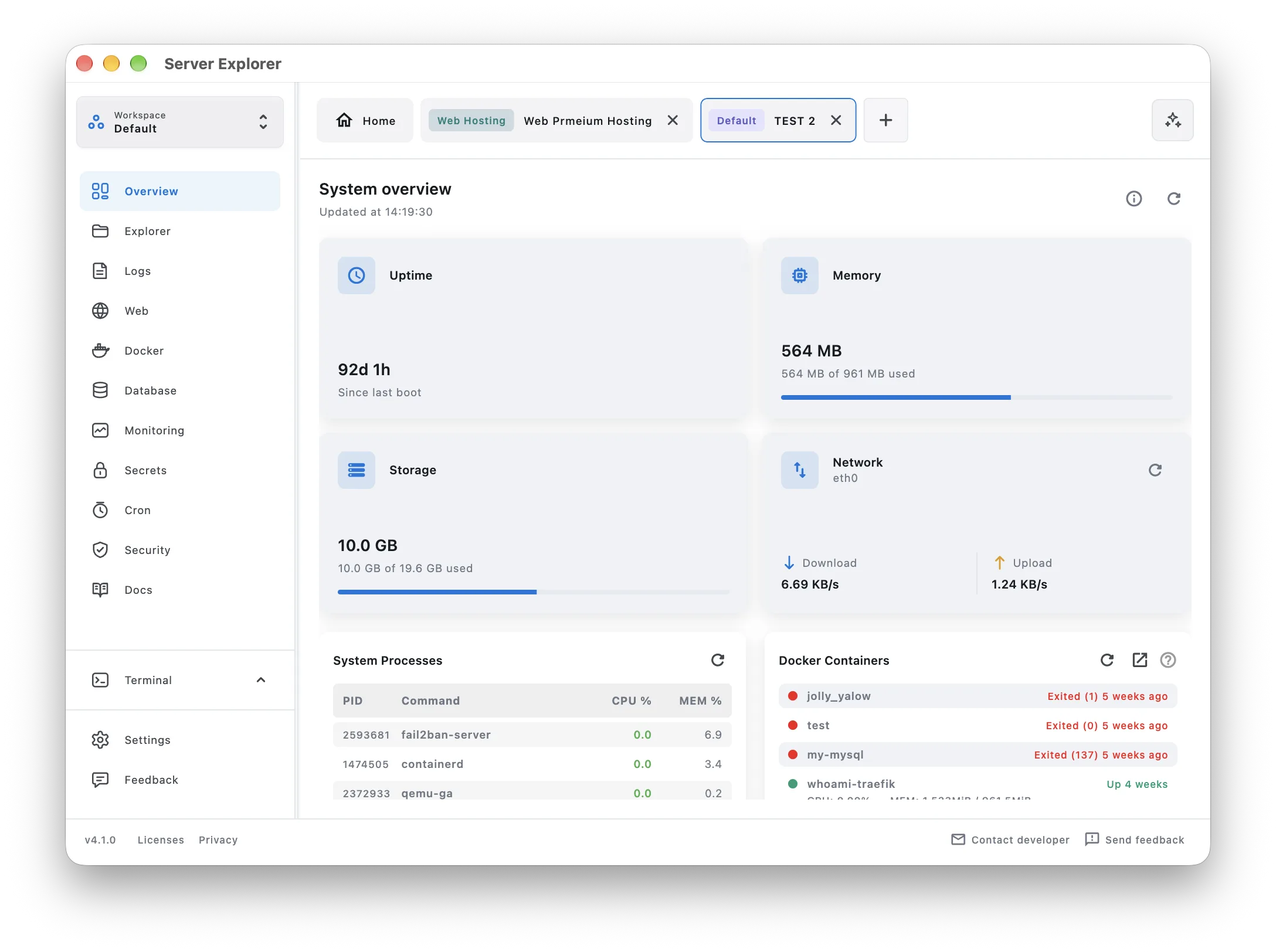
Server Explorer combines SSH access with a visual overview of Linux server health.For a closer look at this workflow, see our guide to managing Linux servers without relying entirely on the terminal.
Bring your servers into focus.
A desktop app for macOS and Windows. Connect over SSH.
2. Tabby — For a Free, Open-Source Desktop Terminal
Best for: developers who want a customizable terminal with SSH connection management.
Tabby is a free, open-source terminal available on Windows, macOS, and Linux. It offers tabs, SSH connections, and a configurable interface with plugins.
If your main complaint about Termius is that you want a free desktop terminal you can customize, Tabby deserves consideration.
Advantages:
- Free and open-source software.
- Cross-platform desktop availability.
- Configurable terminal interface and extensions.
Trade-offs: Tabby is primarily a terminal experience, not a full graphical dashboard for Docker, PM2, and server monitoring. Check the current plugin and file-transfer capabilities against your requirements before migrating.
3. MobaXterm — For Windows Administrators Who Need More Protocols
Best for: Windows users working with SSH, X11, RDP, and remote desktop utilities.
MobaXterm brings several remote-access tools into one Windows application. Its integrated X server, SSH sessions, and SFTP browser are useful when your work extends beyond Linux shell access.
Advantages:
- SSH and graphical SFTP in one interface.
- Built-in X11 support.
- Additional remote-access protocols and utilities.
- Free Home edition for eligible use cases.
Trade-offs: MobaXterm is Windows-focused, and its broad toolset may be unnecessary if you only administer a few Linux VPS instances. Its interface also serves a different purpose from a dedicated Linux server dashboard.
If you are moving away from PuTTY rather than Termius, our Windows SSH guide without PuTTY provides a more focused starting point.
Bring your servers into focus.
A desktop app for macOS and Windows. Connect over SSH.
4. WindTerm — For a Free Multi-Protocol Terminal
Best for: developers and administrators who need a terminal supporting several connection protocols.
WindTerm is a free terminal application with SSH, SFTP, and other remote-session capabilities. It can be attractive when you want a capable terminal and file-transfer workflow without paying for a subscription.
Advantages:
- Free to use.
- SSH and SFTP capabilities.
- Support for multiple terminal-oriented protocols.
Trade-offs: Its focus is terminal connectivity rather than visual application and server management. Before adopting it for production access, review the project’s current releases, security updates, and platform builds.
5. Royal TS / Royal TSX — For Mixed Remote Infrastructure
Best for: administrators who need to organize several types of remote connections.
Royal Apps offers Royal TS on Windows and Royal TSX on macOS. These tools are designed for managing connections across different protocols, including SSH and remote desktop workflows.
Advantages:
- Useful when SSH is only one part of your infrastructure.
- Connection organization for different remote systems.
- Windows and macOS products.
Trade-offs: Royal TS and Royal TSX are not identical products, and some capabilities depend on components or plugins. Check the exact platform edition and license before comparing it directly with Termius.
Which Termius Alternative Should You Choose?
Choose based on the task you repeat most often:
- Choose Server Explorer if you maintain Linux VPS instances and want files, Docker, processes, services, and resource monitoring in one desktop app.
- Choose Tabby if you want a free, customizable, open-source SSH terminal.
- Choose MobaXterm if you work on Windows and need X11 or multiple remote-access protocols.
- Choose WindTerm if you want a free multi-protocol terminal with SFTP.
- Choose Royal TS / TSX if you manage a mixture of SSH and remote desktop connections.
- Keep Termius if its mobile apps and synchronized host workflow are the features you rely on most.
If you want a broader comparison rather than a replacement for Termius specifically, read our best SSH GUI clients for macOS and Windows.
Bring your servers into focus.
A desktop app for macOS and Windows. Connect over SSH.
Before Switching: A Short SSH Migration Checklist
A new client should not put your server access at risk.
- List your hosts. Record hostnames, ports, usernames, and any jump-host requirements. Do not put passwords or private keys in a shared spreadsheet.
- Confirm how keys are stored. Find out whether your existing client supports the export you need. Do not assume every vendor offers a full host-and-key export.
- Back up your SSH configuration securely. If you maintain
~/.ssh/config, keep a protected copy and verify its permissions. - Test one noncritical connection first. Check authentication, SFTP access, and any required port forwarding.
- Keep the old client until validation is complete. Only retire it after you can access every important environment with the replacement.
Avoid emailing private SSH keys to yourself or uploading them to an untrusted conversion service.
Final Thoughts
The right Termius alternative is not necessarily the client with the longest feature list. It is the one that fits your day-to-day work.
For occasional SSH sessions, a free terminal such as Tabby or WindTerm may be all you need. Windows users looking for a broader remote administration toolkit can consider MobaXterm. Meanwhile, Royal TS and Royal TSX are worth evaluating if you manage different types of remote systems.
If your work happens after the SSH connection—checking containers, editing application files, monitoring resources, and managing services—Server Explorer is built around that workflow.
Bring your servers into focus.
A desktop app for macOS and Windows. Connect over SSH.