Secure SSH Connection
Secure SSH Connection to your servers securely in one click.
Local encryption and Zero-Trust SSH ensure credentials never leave your device.
A secure SSH connection is the foundation of every server management workflow. With Server Explorer, you can connect to any Linux or Unix server instantly while keeping your credentials fully encrypted on your local device. The app supports both password-based login and SSH key authentication, giving developers and sysadmins full flexibility over their connection method.
Unlike traditional SSH clients, Server Explorer follows a Zero-Trust architecture: no credentials, private keys, or session data ever leave your machine. This means you can safely manage remote servers across the cloud or on-premises environments without exposing sensitive information online.
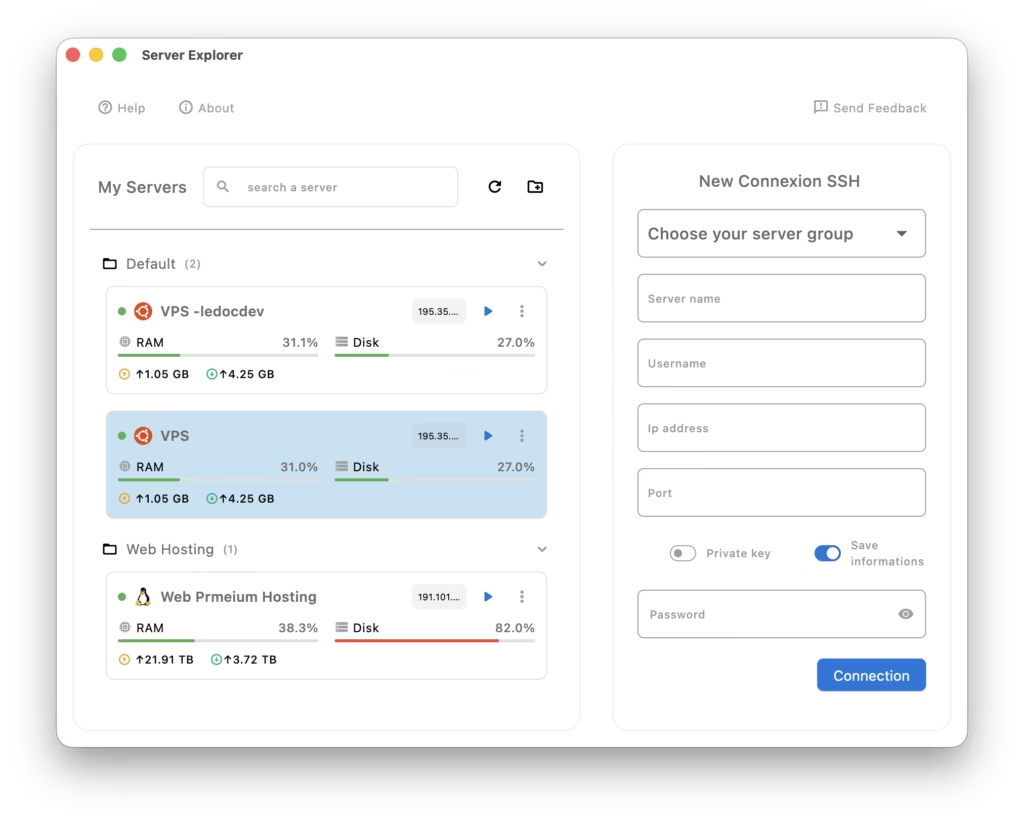
Setting up a connection is simple — just add your server’s IP address, port, and authentication method. You can store multiple connections, organize them by project, and switch instantly between servers through the unified dashboard. This makes Server Explorer perfect for developers working with multiple VPS providers such as DigitalOcean, Hetzner, or PlanetHoster, as well as for self-hosters managing their home labs.
In the left panel of the SSH Connectivity interface, Server Explorer instantly displays essential system metrics for each connected server — including RAM usage, disk capacity, network activity, and IP address. This gives you a real-time overview of your infrastructure before even opening a terminal session. You can immediately detect which servers are under heavy load, which have limited storage left, or whether a network is down.
To ensure smooth operations, the Secure SSH connection feature integrates seamlessly with the rest of Server Explorer’s ecosystem. Once connected, you can jump directly into the Interactive Terminal