Server Security Audit
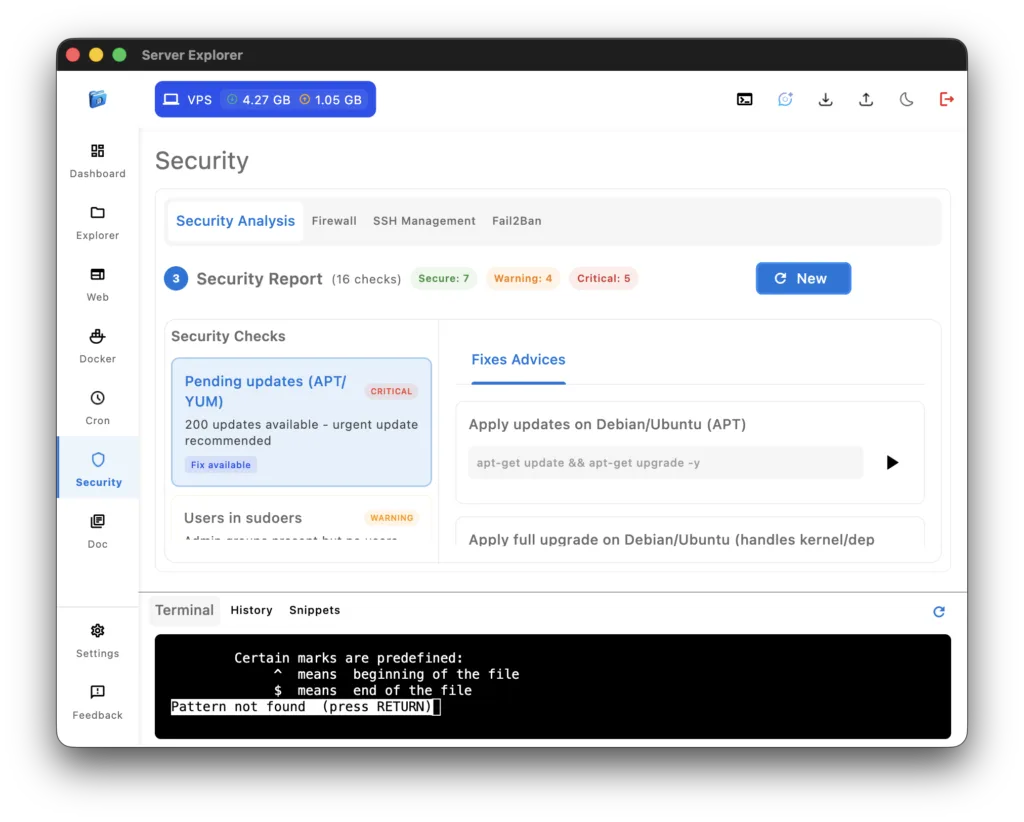
The server security audit feature in Server Explorer helps you understand and strengthen your server’s protection in seconds.
With one click, you can perform a complete security check that inspects your system’s firewall, SSH configuration, open ports, and pending software updates. It’s a simple, visual way to identify vulnerabilities before they become problems.
The audit runs securely over SSH Connectivity, using a local-first approach — no remote analysis or data transmission ever occurs. All tests are performed directly on your device and the connected server, so your credentials and results stay private.
The server security audit reviews essential aspects of your infrastructure:
- Firewall status — checks if UFW, Firewalld, or iptables is active and properly configured.
- SSH configuration — verifies if root login is disabled, password authentication is off, and key-based login is enforced.
- Fail2Ban protection — ensures brute-force defense is enabled.
- Open ports scan — lists running services and exposed ports to help you identify unwanted access points.
- Pending updates — detects security patches waiting to be installed.
- Users in sudoers — reveals which accounts have elevated privileges.
- Automatic security updates — checks if unattended upgrades are active.
Each test includes a status indicator and a recommendation to fix or improve it. You can even copy ready-to-use commands and run them directly in the Interactive Terminal for quick corrections.
For transparency, Server Explorer logs all audit operations locally and never sends data to third-party services. Users remain fully responsible for interpreting and applying results, ensuring maximum control and compliance with their own security policies.
If you want to learn more about securing Linux systems, explore the Debian Security Handbook, or Fail2Ban documentation
By combining simplicity, privacy, and accuracy, Server Explorer’s server security audit makes professional-grade hardening accessible to everyone.